In the world of gaming, having the right hardware can make all the difference. As technology continues to advance, gamers are increasingly turning to custom-built gaming PCs to meet their specific needs. This guide will walk you through the essentials of building your own gaming PC, from selecting the right components to assembly and optimization.
Understanding Your Needs
Before you even think about purchasing any components, it’s crucial to understand your gaming needs. Are you a casual gamer, or do you prefer high-performance gaming? The type of games you play also matters. For instance, if you’re into graphics-intensive games, you’ll need a powerful graphics card and a robust CPU. On the other hand, if you primarily play indie or less demanding games, you might not need top-of-the-line specifications.
Another aspect to consider is your budget. Setting a clear budget will help you make informed decisions and prevent overspending. A budget-friendly build can still deliver excellent gaming performance, especially if you are strategic about the components you choose.
Once you have a clear picture of your needs, it’s time to start researching the components that will make up your gaming PC. Looking for a reliable gaming PC builder can provide you with valuable insights on compatible parts and pricing.
Selecting the Right Components
The core components of a gaming PC include the CPU, GPU, RAM, motherboard, storage, and power supply. Each of these components plays a significant role in the overall performance of your gaming rig.
1. **CPU (Processor)**: The CPU is the brain of your PC. A powerful CPU can handle multiple tasks simultaneously, which is essential for gaming and streaming. Popular choices include AMD Ryzen and Intel Core processors.
2. **GPU (Graphics Card)**: The GPU is perhaps the most crucial component for gaming performance. Brands like NVIDIA and AMD offer a range of options, from budget to high-end models, ensuring there’s something for everyone.
3. **RAM (Memory)**: For gaming, a minimum of 16GB of RAM is recommended. This ensures smooth gameplay and multitasking capabilities.
4. **Motherboard**: Your motherboard should be compatible with your CPU and GPU. It also determines the number of ports and expansion slots available for future upgrades.
5. **Storage**: SSDs (Solid State Drives) are preferred for gaming due to their speed, but many gamers opt for a combination of SSDs and HDDs (Hard Disk Drives) for cost-effectiveness.
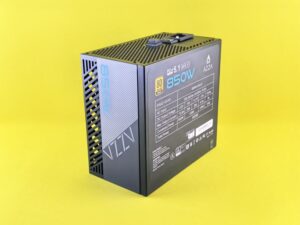
6. **Power Supply**: A reliable power supply ensures that all your components receive the necessary power. Make sure to choose a PSU with a slightly higher wattage than you need to accommodate future upgrades.
Building Your Gaming PC
Once you have gathered all your components, it’s time to start building. This part can be both exciting and daunting, especially for first-timers. Here are some essential steps to follow:
1. **Prepare Your Workspace**: Make sure you have a clean, static-free environment to work in. Gather all your tools, including a screwdriver and cable ties for cable management.
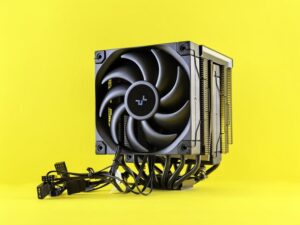
2. **Install the CPU and Cooler**: Start by installing the CPU onto the motherboard. Follow the manufacturer’s instructions carefully to avoid damaging the components. After that, attach the CPU cooler.
3. **Insert RAM**: Next, install the RAM sticks into the designated slots on the motherboard. Make sure they click into place securely.
4. **Install the Motherboard**: Place the motherboard into the case and secure it with screws. Ensure all connections are properly aligned.
5. **Install the GPU**: Slot the graphics card into the PCIe slot on the motherboard and secure it with screws.
6. **Connect Storage Drives**: Install your SSD and HDD into their respective slots and connect them to the motherboard using SATA cables.
7. **Connect Power Supply**: Finally, connect the power supply to all components, ensuring that the cables are neatly organized to promote airflow within the case.
Testing and Optimization
After building your gaming PC, the next step is to power it on and ensure everything is functioning correctly. Enter the BIOS to check that all components are recognized and running at the correct speeds. You may also want to update your BIOS for optimal performance.
Once the system is up and running, install your operating system and necessary drivers. This includes graphics drivers, which can significantly impact your gaming experience.
After installation, it’s essential to test your system with benchmarking tools. These tools can help you gauge the performance of your gaming PC and identify any potential issues. Don’t forget to monitor temperatures and adjust fan speeds using software to prevent overheating.
Future-Proofing Your Build
Gaming technology is ever-evolving, and it’s important to consider future upgrades when building your gaming PC. Choosing a motherboard with multiple expansion slots and a power supply with extra headroom can make upgrades easier down the line.
Additionally, regularly updating your components, especially the GPU, can keep your gaming experience fresh and in line with the latest games and technologies. Consider setting aside a budget for future upgrades as part of your overall gaming investment.
Conclusion
Building your own gaming PC can be a rewarding experience that not only enhances your gaming performance but also provides a sense of accomplishment. By understanding your needs, selecting the right components, and following the assembly process carefully, you can create a machine that meets your specific gaming requirements. Remember, the gaming landscape is always changing, so stay informed on new technologies and be ready to upgrade your build as needed.